I have and configured indico 3.3.6 on my system. created on on event and uploaded abstract and papers. When I copy the url and paste that url in another browser where no one is logged into the website , I am able to download.It is not asking for authentication. how to avoid this kind of access
please provide an example link of files that you believe shouldn’t be accessible.
https://domainname/event/1/contributions/2/attachments/2/2/Screenshot%202025-06-24%20162008.png.
This is link.
Domainname is custom.
Is there any guideline for configuration of various variable under protection .
If yes please provide.
materials are accessible to anyone who can access the contribution, unless they’re marked as protected during upload (you can also edit them to change this later).
so no security problem nor a bug here.
Sir thank you for the reply.
Can you guide me to how to set protection under this.
What configuration. This is first time I have done indico.
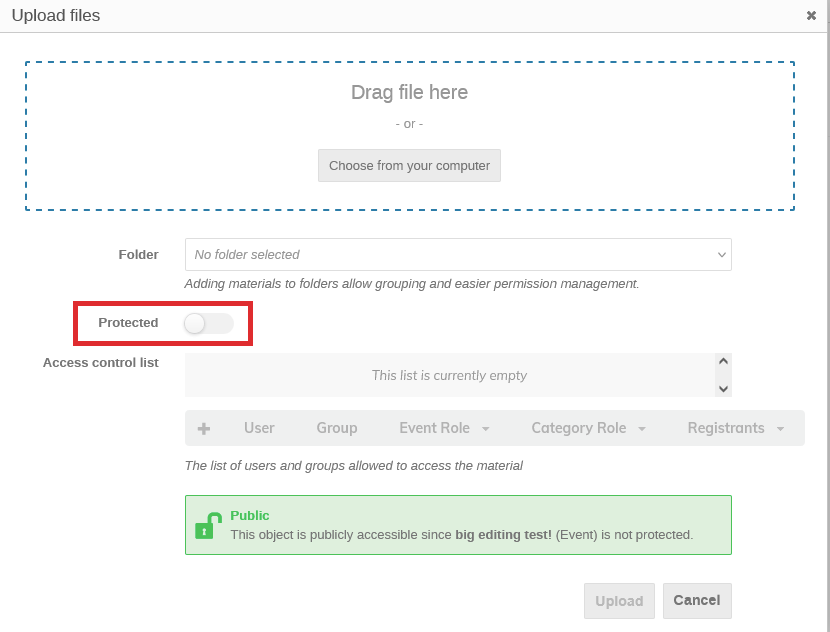

Sir is there any option to set this a default for all kind of upload.
Nope.
Ok thank you sir
Just wondering, what’s your usecase? The files uploaded to a contribution are usually things like slides, so it makes sense that they are accessible to people who can access the contribution…
(the only usecase I’ve heard of so far was events where they only want to release the slides after the actual talk)
use case is
User 1 uplaod attachement for abstract and paper.
Same user 2 also does.
When I login as user1 and copy the link of attachement and log out and then paste that url , It was allowing to downlaod. But When change protection mode to Protected , this behaviour was not seen.
One more doubt. can you guide me which file is called on lading page of indico conference .
This did not answer my question, I was wondering why you want to make all contribution materials more restricted than the contribution/event itself.
Can you guide me which file is called on lading page of indico conference
This is not a single file. And you should almost certainly not start editing random files/templates from Indico, as this will be lost during updates. Please open a new thread explaining what you want to change, and we can possibly tell you a better way to do so (unless there is none).
11 posts were merged into an existing topic: Max file upload limit
Here’s our own use case: We want all events to be public (not protected), so the wider community or general public can see which events are (or have been) happening. But some events will contain materials that cannot be made public (e.g. containing information shared under the TLP other than “clear”) but only made available to the participants of a given event.
AFAIU we should use ACLs for that but we don’t have/want any local user accounts (only via IDP) and some events are open to the general public, meaning some participants will not have an IDP to authenticate at (i.e., they cannot log in). Those events consequently allow public registation and that all works fine until the question of protecting materials comes up.
(That seems to be the same use case Barbara mentions in the thread about protecting photos of participants.)
I had hoped that we could use event access keys to protect selected materials (cf. Restrict materials access - #4 by Jacky_Li or Access Key for Uploaded Materials · Issue #3101 · indico/indico · GitHub ) but that’s not possible.
The other thing I could think of — registration confirmation emails contain a tokenthat allow access to their registration without having to authenticate — also didn’t work for accessing protected materials, unfortunately.
Seems the only option we’re left with would be to protect (i.e., hide) the whole event (with an access key because, again, we can’t use IP ranges or require accounts for events widely open) instead of only protecting (selected) materials?
I think it might be possible to write a plugin that intercepts the access check (we have a signal for that!) on materials and then uses the access key…
Would it be possible to create an ACL limiting access to materials to anyone authenticated (i.e., “authenticated == authorised”)? Seems that would be trivial to do if we had a (pseudo-)group “All users” containing all users in the system.