ok thank you sir.
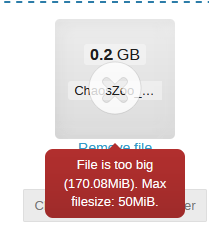
Sir I am trying to set max attachement to be 50 MB . I tried below
/opt/indico/etc
MAX_UPLOAD_FILE_SIZE = 50
MAX_UPLOAD_FILES_TOTAL_SIZE = 50
/etc/nginc/conf.d/indico.conf
client_max_body_size 50M;
Still I am able to uploade file size of 53 MB as attachement for call for abstract
Please guide me indico3.3.6
Test with a 55MB or 60MB file, just in case it’s a matter of calculating sizes using 1024 vs 1000.
just tried with 73MB file
Did you restart systemctl restart indico-uwsgi.service after changing indico.conf?
yes sir
systemctl restart indico-uwsgi and also nginx
In that case I would expect it to work…
No sir I am trying since morning to limit the file upload and allowed formate to upload
There is no setting (in most places of Indico) to restrict the file extensions.
Sir in that hacker can put .exe file or some script ? how to ensure secure file upload
What harm would it do? The server would not execute either of them, and a user typically does not download and run random exe files. Also, contributions only exist if you as an event manager create them or accept an abstract from someone proposing one. In both cases, it’s not a total stranger who will upload the files.
FWIW, nothing would stop someone from uploading let’s say a set of slides with a link pointing to an exe file hosted elsewhere. In fact, that would be harder to spot than someone trying to upload a malicious file directly as materials…
I just tested the file size limits and for me they work as expected. So the problem must be somewhere on your end…
1 Like
Sir @ThiefMaster
Please share with me location of file and syantx which you did to limit attachment of call for abstract.
MAX_UPLOAD_FILES_TOTAL_SIZE = 50
MAX_UPLOAD_FILE_SIZE = 50
in /opt/indico/etc/indico.conf
1 Like