Hello,
Our Indico is open to the world because we’re a research institute with international collaborations, and anyone can create an account in it. Is there a way to restrict which users can book rooms? In an ideal case, only users with emails from our domain should be able to.
Best,
J
Yes, configure an ACL in the Room Booking admin settings. As soon as the ACL is not empty, only these people can access the room booking module.
This is also what we do on CERN Indico - anyone can login on Indico, but RB is restricted to CERN people.
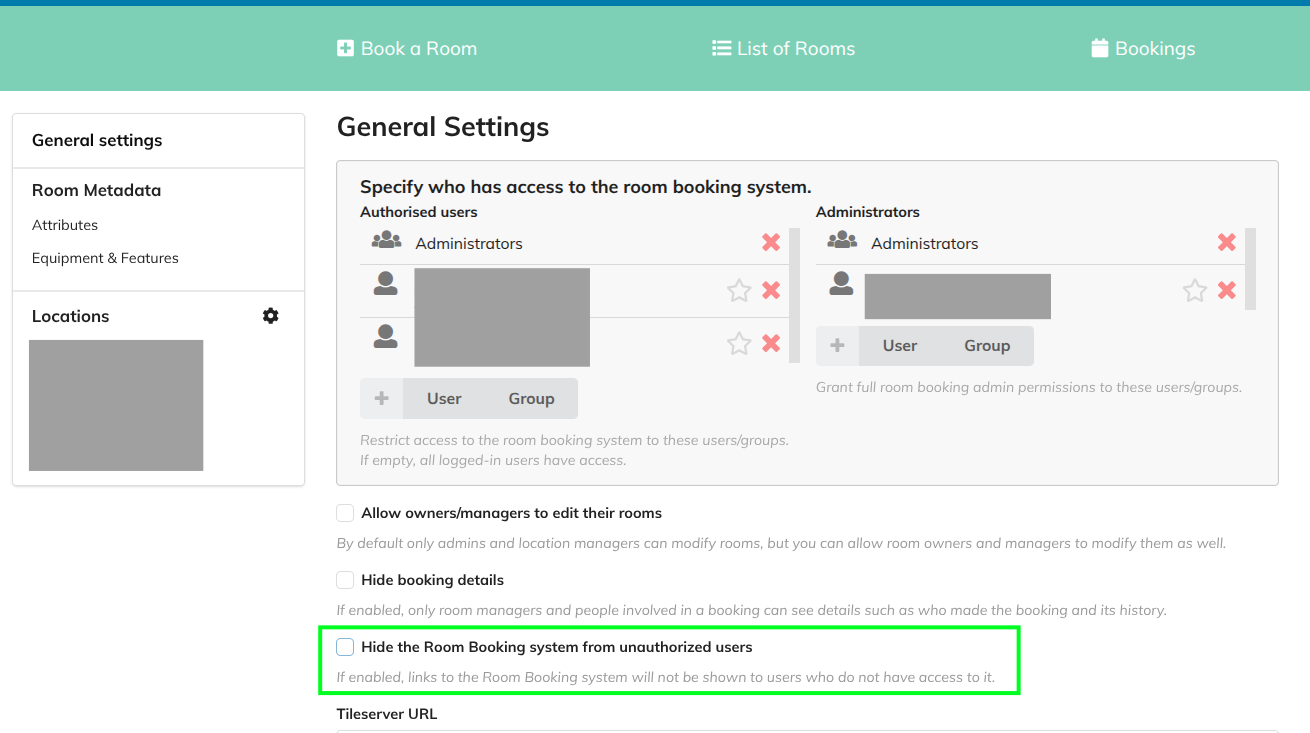
These are our settings now, maybe it’s more or less as we wanted already. If I understand it correctly, only Indico admins and a pair of users from our institution (greyed out) can access the room booking. Anyway, I’m wondering about the option marked green:
This is just about the top menu button on regular Indico pages (e.g. the home page).
For example on CERN Indico we always show it, so someone with no access can click it and get an “access denied” message. If that person happens to be a person who believes that they should have access, they usually open a support ticket.
But in other instances you may only want to show the button to those with access, e.g. because you think it confuses everyone else. Then you could tick this to hide it for others.
Thanks! So I talked with the rest of our IT team, and we think it’s best that all Indico users with an account of our domain can book rooms. In that sense, we thought about creating an Indico group with all users matching that criterion. I’ve tried to do so, but there are so many that I cannot bulk add all of them (“Your query matched too many users. Please try more specific search criteria.“). Is there a way to do it? Maybe from the terminal?
I found this discussion Add many users to a group , I followed the instructions and it worked, so it’s done!